Hero Components
A collection of beautiful hero sections with various styles and features.
Hero Section Variants
Our starter includes three pre-built hero section layouts that you can use in your project:
- Minimal Layout (
layoutVariant: 'minimal') - A clean, focused design with essential elements - Featured Layout (
layoutVariant: 'featured') - Enhanced layout with prominent visuals and content - Extended Layout (
layoutVariant: 'extended') - Comprehensive design with additional features and content areas
Before you start, make sure you have a Hero.astro file inside your
sections folder. If you don’t have it, create one and copy the code. If you already have it, you can just overwrite the content with
the code.
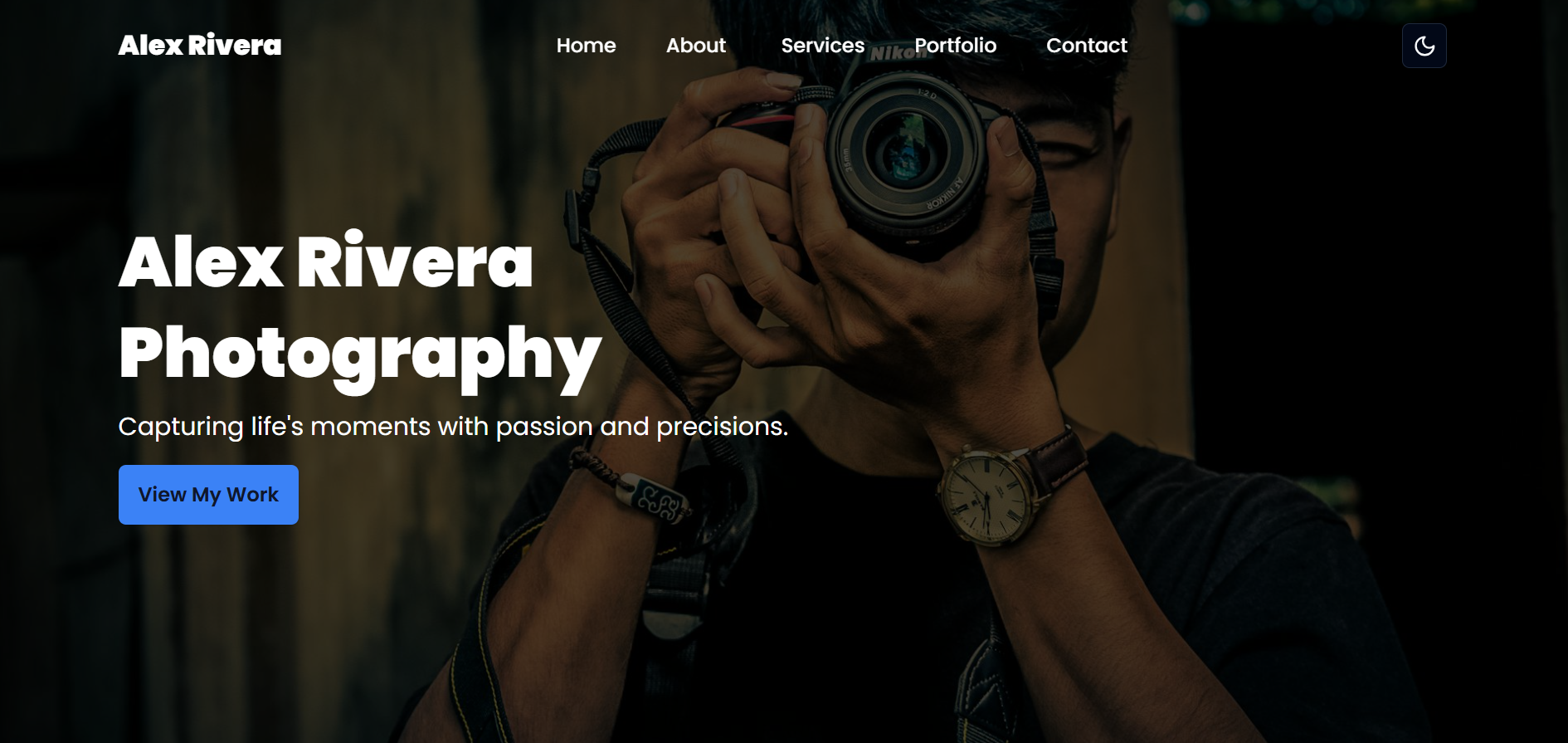
---import { Button } from '@/components/ui/button';import { getHeroByVariant } from '@/lib/helper';import { getHeroContent } from '@/lib/queries';import type { HeroButtonProps } from '@/lib/types';
const hero = await getHeroContent();
// Get specific hero variantconst defaultHero = getHeroByVariant(hero, 'default');
// Add fallback in case the variant doesn't existif (!defaultHero) {  throw new Error('Default hero variant not found in Sanity content');}---
<section id="home" class="mt:pt-10">  <div class="relative z-40">    <div class="absolute left-0 top-0 h-full w-full bg-black opacity-70"></div>
    <div class="container flex h-screen flex-col items-start justify-center">      <div class="z-40 max-w-[600px]">        <h1 class="mb-2 text-600 font-900 leading-[1.3] text-white md:text-900">          {defaultHero.title}        </h1>        <p class="mb-4 text-white md:text-300">          {defaultHero.subtitle}        </p>        {          defaultHero.button.map((item: HeroButtonProps) => (            <a href={item.url}>              <Button className="py-6 font-600"> {item.title} </Button>            </a>          ))        }      </div>
      {        defaultHero.imageType === 'upload' ? (          <img            class="absolute left-0 -z-10 h-full w-full object-cover"            src={defaultHero.image?.asset.url}            alt={defaultHero.image?.alt}          />        ) : (          <img            class="absolute left-0 -z-10 h-full w-full object-cover"            src={defaultHero.url}            alt={defaultHero.image?.alt}          />        )      }    </div>  </div></section>
---import { Button } from '@/components/ui/button';import { getHeroByVariant } from '@/lib/helper';import { getHeroContent } from '@/lib/queries';import type { HeroButtonProps } from '@/lib/types';
const hero = await getHeroContent();
// Get specific hero variantconst featuredHero = getHeroByVariant(hero, 'featured');
// Add fallback in case the variant doesn't existif (!featuredHero) {  throw new Error('Creative hero variant not found in Sanity content');}---
<section id="home" class="mt:pt-10">  <div class="relative z-40">    <div class="absolute left-0 top-0 h-full w-full bg-black opacity-70"></div>    <div      class="container flex h-screen items-center justify-center text-center"    >      <div class="z-40 max-w-[800px]">        <p          class="mx-auto mb-4 w-fit max-w-[600px] rounded-full bg-primary px-4 py-2 capitalize text-white"        >          {featuredHero.tag}        </p>        <h1 class="mb-4 text-600 font-900 leading-[1.2] md:text-900">          {featuredHero.title}        </h1>        <p class="mb-4 md:text-300">          {featuredHero.subtitle}        </p>        {          featuredHero.button.map((item: HeroButtonProps) => (            <a href={item.url}>              <Button className="py-6 font-600"> {item.title} </Button>            </a>          ))        }      </div>
      {        featuredHero.imageType === 'upload' ? (          <img            class="absolute left-0 -z-10 h-full w-full object-cover"            src={featuredHero.image?.asset.url}            alt={featuredHero.image?.alt}          />        ) : (          <img            class="absolute left-0 -z-10 h-full w-full object-cover"            src={featuredHero.url}            alt={featuredHero.image?.alt}          />        )      }    </div>  </div></section>
<style>  h1 {    background: linear-gradient(      to right,      theme('colors.primary.DEFAULT'),      theme('colors.secondary.foreground')    );    -webkit-background-clip: text;    -webkit-text-fill-color: transparent;  }</style>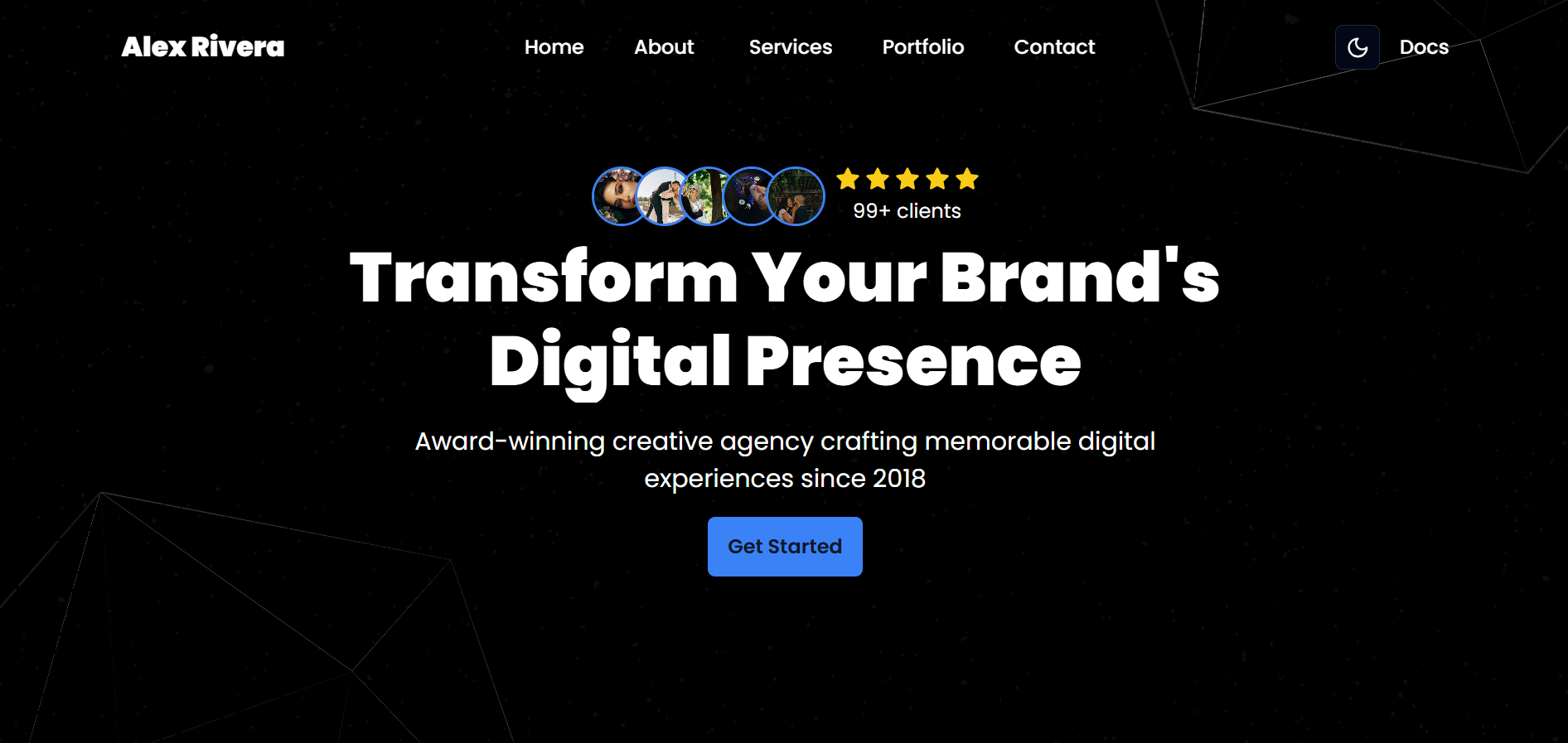
---import { Button } from '@/components/ui/button';import { getHeroByVariant } from '@/lib/helper';import { getHeroContent } from '@/lib/queries';import type { HeroButtonProps } from '@/lib/types';import { Star } from 'lucide-react';
const hero = await getHeroContent();
// Get specific hero variantconst extendedHero = getHeroByVariant(hero, 'extended');
// Add fallback in case the variant doesn't existif (!extendedHero) {  throw new Error('Creative hero variant not found in Sanity content');}---
<section id="home" class="mt:pt-10">  <div class="relative z-40">    <div class="absolute left-0 top-0 h-full w-full bg-black opacity-70"></div>    <div      class="container flex h-screen items-center justify-center text-center"    >      <div class="z-40 max-w-[800px]">        {          extendedHero.socialProof?.enabled && (            <div class="mb-2 flex items-center justify-center gap-2">              <div class="flex">                {extendedHero.socialProof.profiles.map((profile, index) => (                  <img                    class="h-12 w-12 rounded-full border-2 border-primary object-cover transition-transform duration-300 hover:-translate-y-1"                    style={{                      marginLeft: index !== 0 ? '-13px' : '0',                    }}                    src={profile.asset.url}                    alt={profile.alt}                  />                ))}              </div>
              <div class="flex flex-col">                <div class="flex items-center gap-1">                  {[...Array(extendedHero.socialProof.rating)].map(                    (_, index) => (                      <Star                        key={index}                        className="w-5 h-5 mb-1 fill-yellow-400 text-yellow-400"                      />                    )                  )}                </div>                <div class="text-white">                  <span class="font-semibold">                    {extendedHero.socialProof.count}+                  </span>{' '}                  {extendedHero.socialProof.text}                </div>              </div>            </div>          )        }
        <h1 class="mb-4 text-600 font-900 leading-[1.2] md:text-900">          {extendedHero.title}        </h1>        <p class="mx-auto mb-4 max-w-[600px] text-white md:text-300">          {extendedHero.subtitle}        </p>        {          extendedHero.button.map((item: HeroButtonProps) => (            <a href={item.url}>              <Button className="py-6 font-600"> {item.title} </Button>            </a>          ))        }      </div>
      {        extendedHero.imageType === 'upload' ? (          <img            class="absolute left-0 -z-10 h-full w-full object-cover"            src={extendedHero.image?.asset.url}            alt={extendedHero.image?.alt}          />        ) : (          <img            class="absolute left-0 -z-10 h-full w-full object-cover"            src={extendedHero.url}            alt={extendedHero.image?.alt}          />        )      }    </div>  </div></section>
<style>  h1 {    background: linear-gradient(      to right,      theme('colors.white'),      theme('colors.white')    );    -webkit-background-clip: text;    -webkit-text-fill-color: transparent;  }</style>
How to Use
To implement these hero components:
- Copy the code from your desired hero variation
- Paste the code inside
Hero.astrofile inside thesrc/sectionsfolder - Customize the content as needed through your Sanity Studio
The layout variants are designed to be flexible and work across different types of content while maintaining consistency in your design system.